Prerequisites
- Admin access to Klaviyo flows and API keys
- A sunset, bot-handling, or similar automation where you want a real unsubscribe (not only a profile tag)
- Comfort editing JSON in a Webhook action
Walkthrough video
Step-by-step screen recording: https://fathom.video/share/bX6jBA-TwonmHxgoxFsZP2RhntcGC3Qy
Why the default sunset template falls short
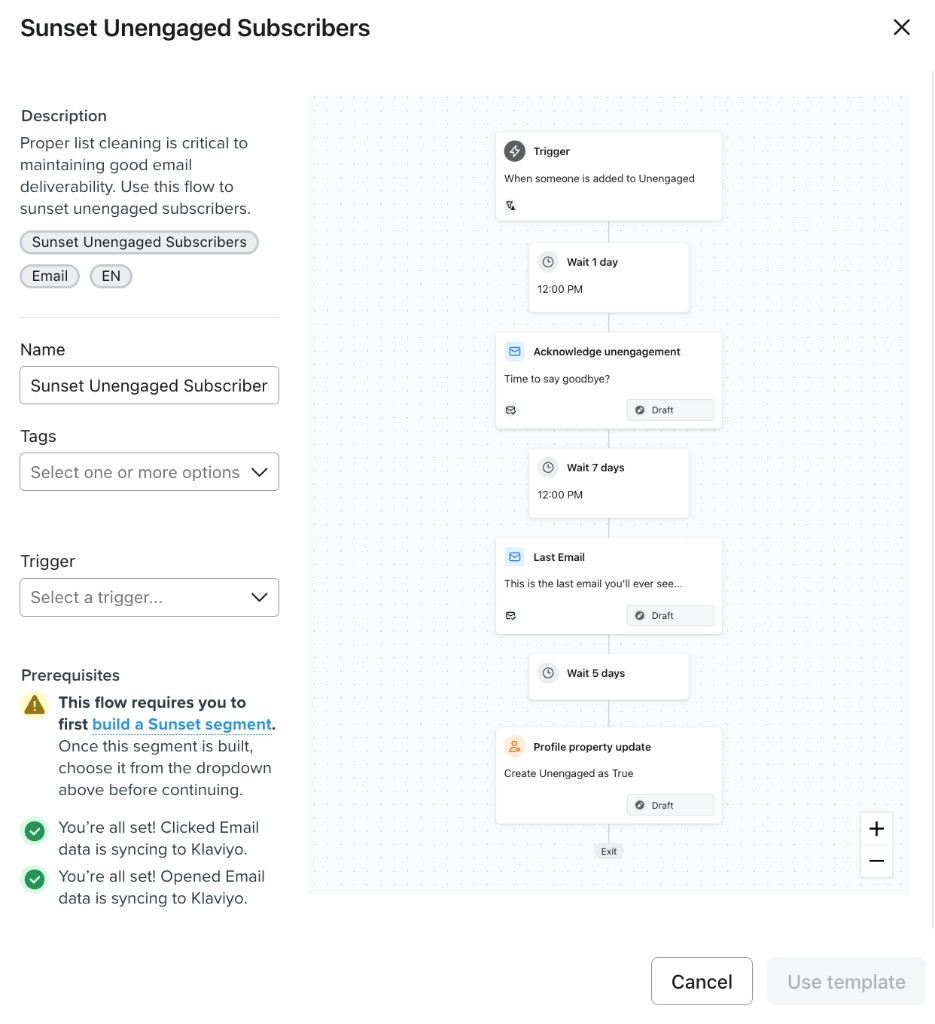
Klaviyo’s “Sunset Unengaged Subscribers”–style templates often end with a profile action such as setting a custom property (for example “Unengaged” = true). That tags the person but does not revoke marketing consent. For deliverability and compliance, you usually want a true unsubscribe from email and SMS marketing — which you can do with a flow Webhook that calls Klaviyo’s Bulk Unsubscribe Profiles API.
API reference and an important caveat
Official endpoint documentation: https://developers.klaviyo.com/en/reference/bulk_unsubscribe_profiles. Klaviyo warns that profiles not in a specified list may be globally unsubscribed when using this job — design your flow and audience so only the right people hit this Webhook, and read the latest docs before going live.
Create a private API key for flow webhooks
In Klaviyo, go to Account → Settings → API keys and create a new private key used only for this flow Webhook. Grant the scopes required for the Bulk Unsubscribe endpoint (see the API reference — typically lists, profiles, and subscriptions write access). Copy and store the key in a password manager: Klaviyo will not show the full secret again later. You will paste it into the Webhook’s Authorization header as Klaviyo-API-Key YOUR_KEY.
Replace the tag-only step with a Webhook
Open your sunset or bot flow in the flow editor. Remove or bypass the profile-property step that only marks someone as unengaged (or equivalent). Add an action: Webhook (HTTP request). Set the method to POST. You will point it at Klaviyo’s bulk unsubscribe jobs URL in the next step.
Set the request URL
Use POST to https://a.klaviyo.com/api/profile-subscription-bulk-delete-jobs — this is the Bulk Unsubscribe Profiles job endpoint described in Klaviyo’s reference. Do not use a browser GET; the flow must send JSON in the body.
Add HTTP headers
In the Webhook configuration, add one header row per line below. Replace INSERT-API-KEY with the private key you saved (after Klaviyo-API-Key and a space). You may use a newer revision date if Klaviyo’s docs specify one for this endpoint.
Paste the JSON body with profile merge tags
Use the payload below. {{person.email}} and {{person.phone_number}} are Klaviyo profile variables so each recipient is unsubscribed individually. Phone should be in E.164 if present. If someone has no phone, behavior depends on Klaviyo’s validation — you may need a branch or trimmed payload for SMS-disabled profiles (see the last step).
Pro Tip: Klaviyo’s docs also note a maximum of 100 profiles per call; a single-profile Webhook like this stays within that limit.
Preview and test (runs live)
Use Klaviyo’s Webhook Preview with a real test profile. Preview actually executes the Webhook against that example profile — it is not a dry run. Confirm the profile’s email/SMS marketing consent updates as expected. If something fails, inspect request and error details in the developer dashboard: https://www.klaviyo.com/developer-tools/dashboard
If SMS isn’t configured: 400 errors and payload trim
When SMS is not set up for the account, including SMS blocks in the JSON can produce a 400 response. Remove the entire sms object under subscriptions (and omit phone_number if unused) so the job only unsubscribes email marketing. Re-test with Preview. Keep the API key scoped and rotate it if it is ever exposed.
Want us to handle this for you?
Our team implements these playbooks daily across hundreds of brands.
Book Implementation Call