Ideating email/SMS campaign calendars can be difficult. Questions of what type of content to send, at what frequency, to which groups are just some of the answers you need to come up with.
We'd like to share a starting framework that we use to create many of our email campaign calendars. We build dozens of calendars each month across a set of eCommerce industries, so we know this framework works well. The central idea is to organize campaigns by theme.
Easier to Generate Campaign Ideas
From a purely creative planning perspective, it's easier to start with a base set of themes and then brainstorm campaign ideas relating to each theme. Furthermore, the content of certain recurring themes may already be pre-slotted based on your blog content creation schedule, new product release cycle, or marketing promotions calendar.
As writers can relate, there's nothing more daunting than a blank page. Once you get some ink on the page, it's a lot easier to keep the momentum going.
The general problem is that even the best of marketers are going to experience a limit to how many “good” ideas they can generate. After you come up with five, ten, or even twenty good ideas, the quality slips. If you are sending twenty emails a month, the idea quality in the second month will likely already be poor.
A theme-based calendar gives you a structural scaffold to ideate within, which consistently produces better results than staring at a blank spreadsheet.
Theme-Audience Fit
Marketers are always touting sending the “right content, to the right audience, at the right time”. By using a theme-based campaign approach and segmenting your audience accordingly, you can get closer to this marketing holy grail.
For example, you can build user-interest level segments based on a combination of past interaction with that theme type's campaigns. For a Blog-type campaign theme, you might layer in:
- Engagement history — who has clicked previous blog-type campaigns?

- Browse behavior — who has visited your blog or content pages recently?

- Stated preferences — who explicitly opted in to educational content at signup?

While you can certainly build a different segment for each individual campaign, we recommend keeping a certain level of consistency of the segments pegged to each theme type. This way you get multiple exposures of a particular segment configuration to a similar set of campaigns, and thus have a better base of data to judge the effectiveness of the segment.
Reducing Content-Production Workloads
A more disciplined segmentation approach via theme-based campaigns also helps keep the number of content variants manageable. With too many axes of segmentation, you can easily get overwhelmed with way too many email variants per campaign.
As an illustrative example, if you had been segmenting based on gender on every email campaign:
3 content variants (male, female, unknown) × 16 email campaigns per month = 48 campaign content variants per month.
And if you were to further introduce another segmentation variant like customers vs. leads:
2 × 48 = 96 campaign content variants per month.
This can quickly get overwhelming in terms of resources for producing the content.
Now, if instead you used a theme-based approach, you may have found that gender segmentation only really produced a sizable lift for Blog-type emails, which you only send 4× per month:
3 content variants × 4 blog-type campaigns + 8 other campaigns = 20 campaign content variants per month — less than half.
In short, you can drastically reduce content-production workloads using a theme-based campaign planning approach while still capturing the segmentation lifts where they actually matter.
A/B Testing and Optimisation Become More Actionable
Say for example you were testing a singular user-generated content (UGC) campaign using a Smart Send optimization feature and you get a clear winning variant:
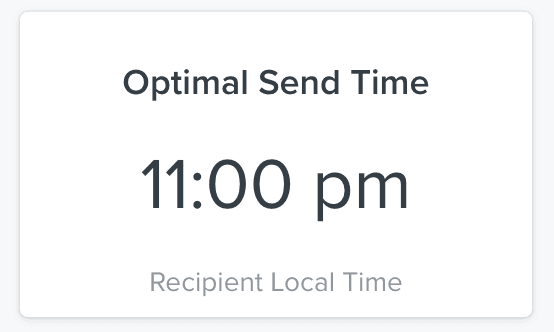
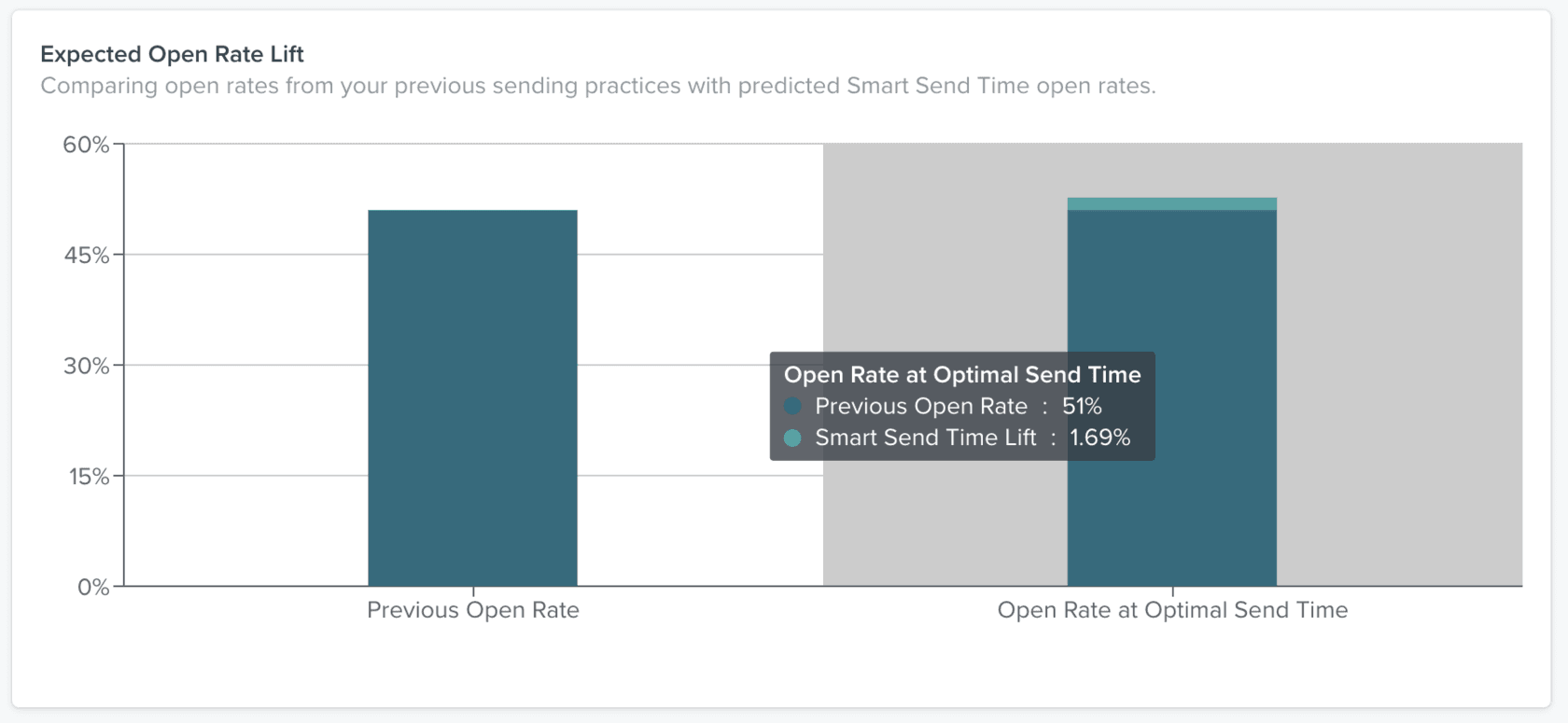
Here's a case where you have a clear result, but the question is: so what?
While the answer for automated flows would be simple (just use the winning version for all future sends), the answer for one-time campaign emails is trickier. Since each campaign is a one-shot exposure, replicating the theoretical learnings from the A/B test is difficult because the next campaign you send will necessarily introduce a host of other variables.
When you work from themes, however, you can start pulling forward A/B test results that apply to the entire group of campaigns within that theme. For example, if a send-time test reveals that sales-oriented campaigns perform best on Sunday at 11am, you can now schedule all sales-oriented campaigns for that window — and start running further refinement tests from that baseline.
Faster Insights Without Formal Testing
What's even more interesting is that you could potentially get insights quicker than formal A/B tests for certain variables like send days and times. If you're already sending certain themed emails across different days and times, just aggregating the data will start shedding insights.
For example, you might discover that although most UGC-themed campaigns were sent on Tuesdays, it's actually Fridays that show the highest engagement and sales rates:
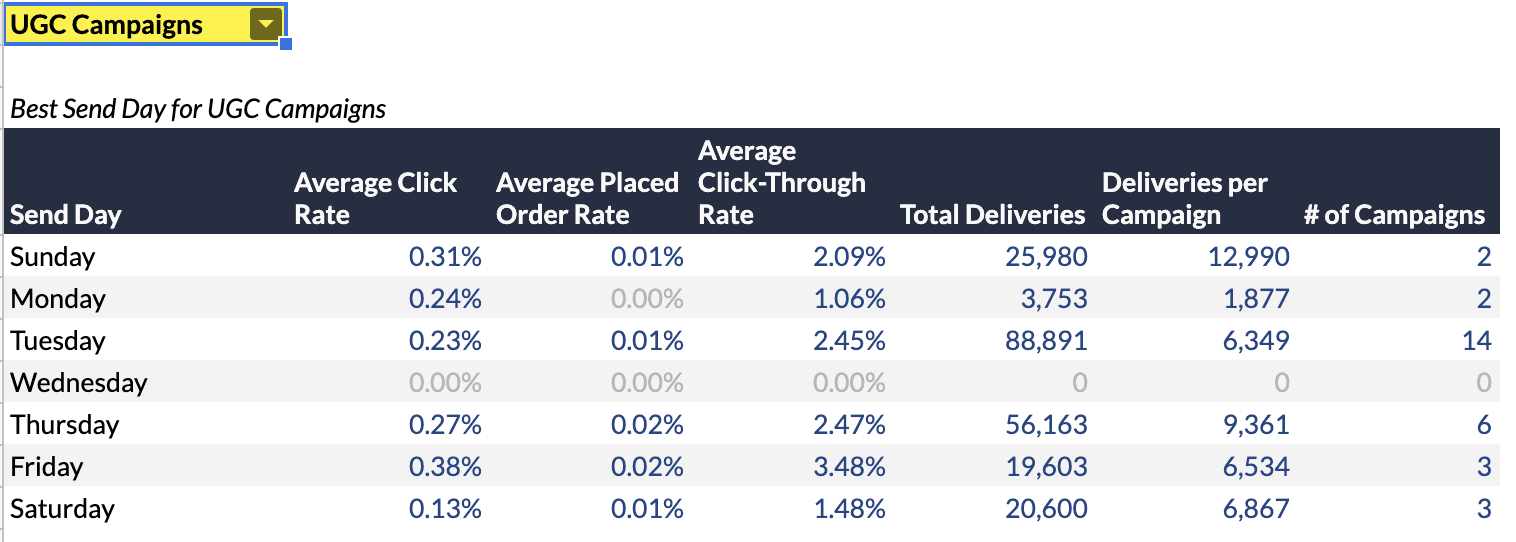
You can shift the send date going forward to favour Fridays and start running further tests on which hours are best.
When you don't have a starting grouping (like theme) to work off of, you get a lot more noise in the data averages. You may even draw wrong conclusions and decrease your campaign performance.
Using the same data set with all campaign types mixed together, you might see Tuesday as the strongest day overall:
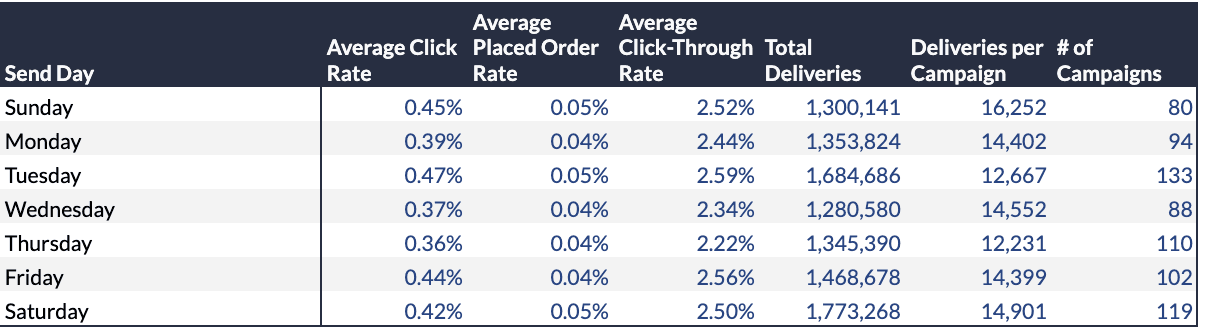
But that would be a mistaken conclusion for UGC campaigns specifically. Theme-based grouping isolates the signal from the noise.
Matching Theme Goals & Metrics
Using an organizational unit focused on theme rather than singular campaigns allows you to track metric trends across each larger theme group over time:
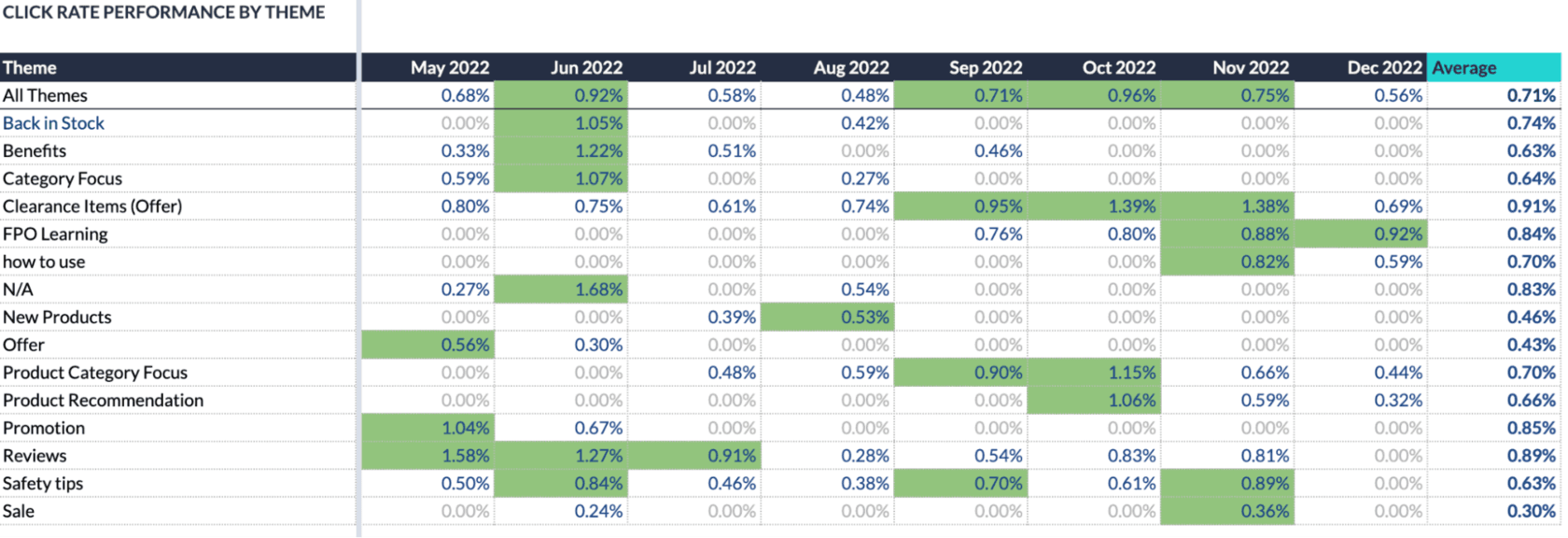
Viewing trends month-over-month by theme helps you identify if your efforts at improvement are successful, especially when benchmarked against the theme's own trailing averages.
This also raises an important question: should we be measuring all campaigns by the same set of metrics?
Our answer is no. While we certainly want to look at the regular cast of metrics — open rate, click-through rate, conversion rate — different types of campaigns should be judged more heavily by different metrics:
- Sales-oriented campaigns — judged primarily by revenue and sales conversion rate. Open rates and click rates are secondary.
- Educational / blog campaigns — judged primarily by click-through rate and time on page post-click. Dollar-related metrics are a nice bonus, but engagement is the goal.
- Loyalty / retention campaigns — judged by repeat purchase rate and customer lifetime value impact over a longer window.
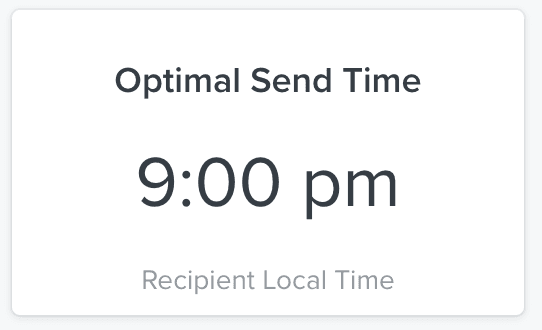
Consider a send-time optimization test for a sale-oriented campaign that shows 9pm as the optimal send time for highest open rates:
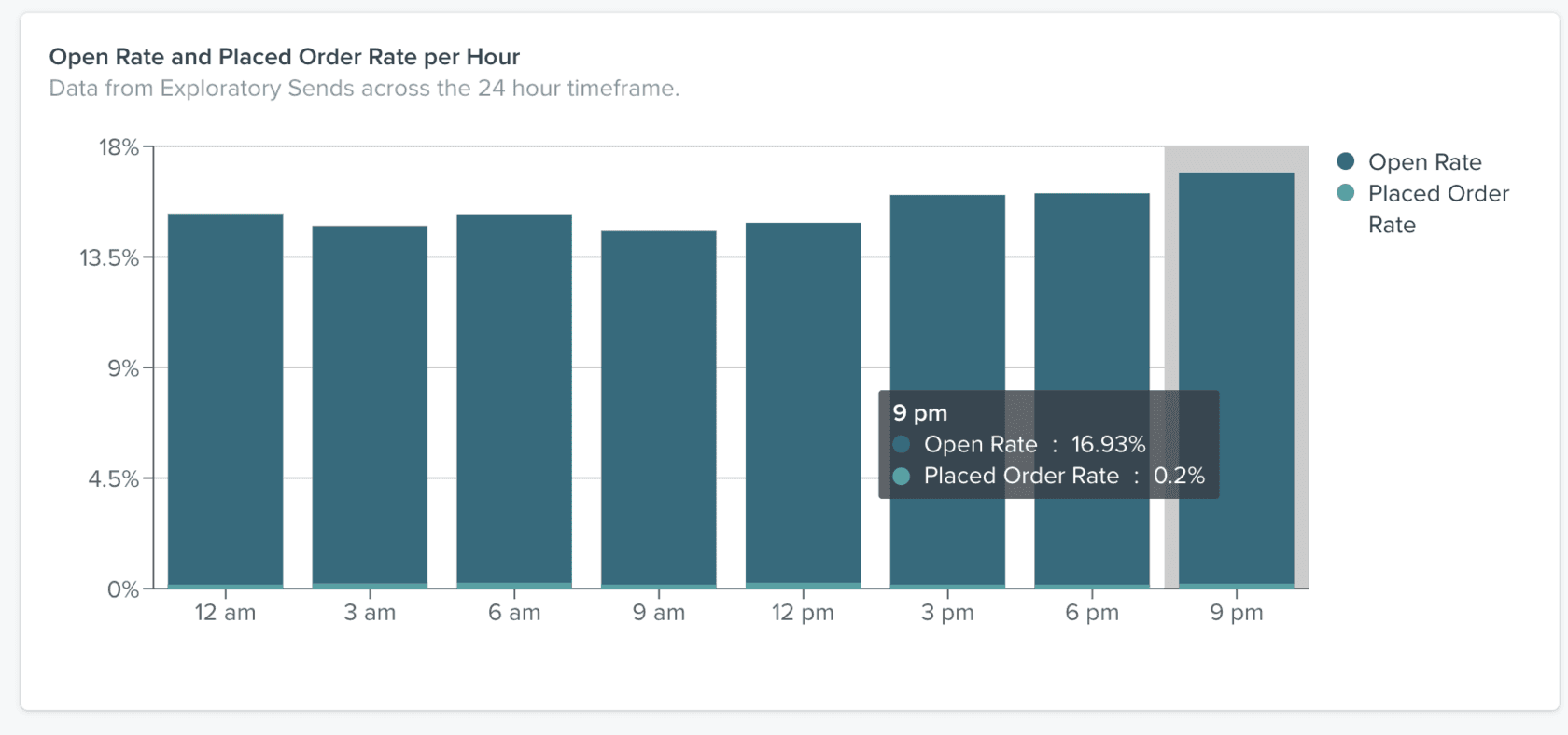
But if you look at the order rate at 6am — 0.25% vs. 0.20% at 9pm, a relative 25% difference:
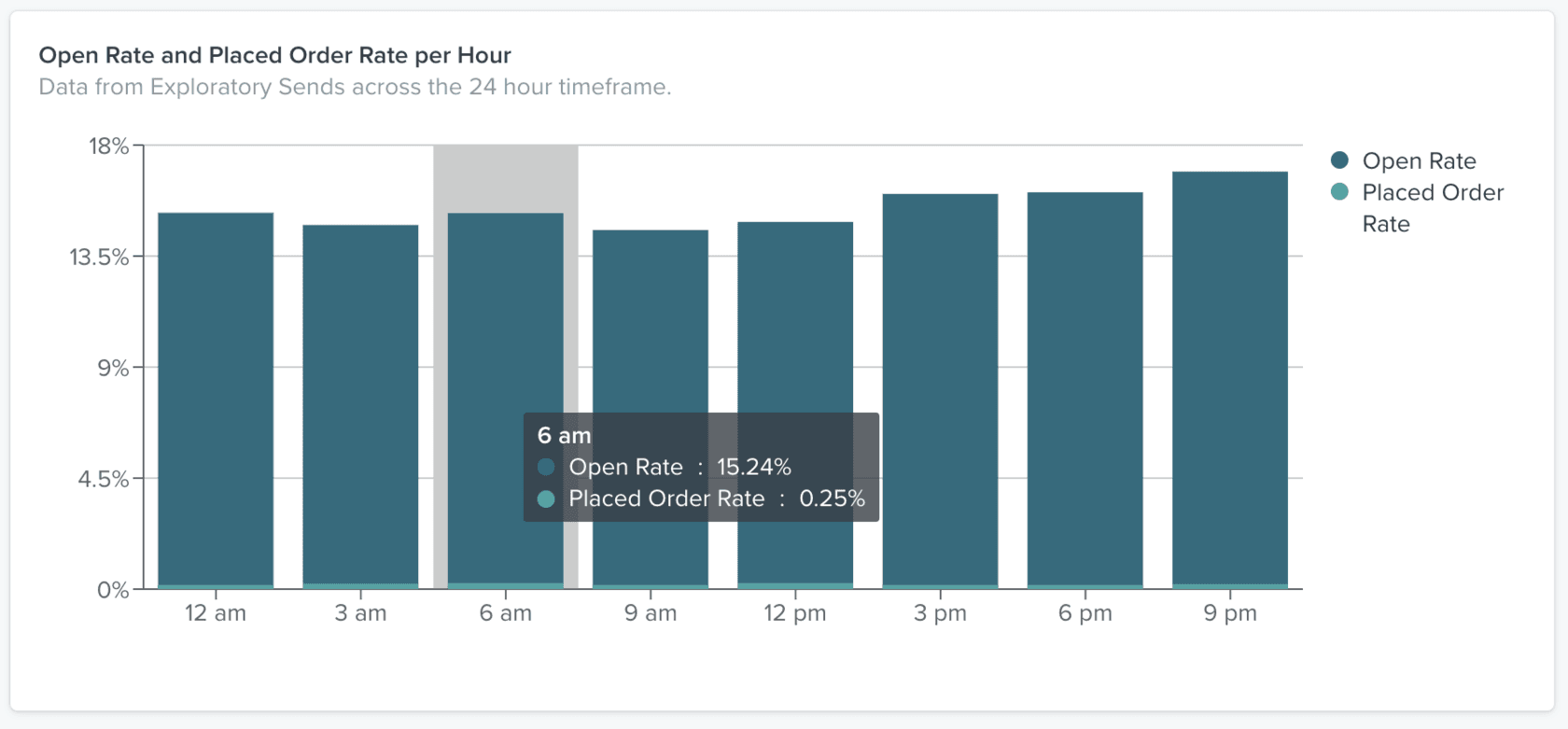
If you evaluate this campaign based on the wrong primary metric, you wouldn't be formulating the correct conclusion. You'd actually be creating less effective campaigns over time.
When you use theme-based campaigns as an organizing principle, matching metric goals to each theme becomes natural. You optimize for the correct numbers for each group, and the standardized content type means future day/time tests carry more conclusive power.
Putting It Into Practice
Here's how we typically structure a theme-based calendar for our clients:
- Identify 4–6 core themes that match your brand's content pillars (e.g. New Products, Educational Content, UGC / Social Proof, Promotions, Brand Story, Seasonal).
- Assign each theme a recurring cadence — some themes might be weekly, others bi-weekly or monthly, depending on your total send frequency.
- Build theme-specific segments based on engagement history, browse behaviour, and stated preferences. Keep these consistent across campaigns within each theme.
- Define primary KPIs per theme — revenue for sales themes, engagement for educational themes, and so on.
- Run A/B tests within themes rather than across your entire send calendar. This gives you clean, actionable results you can apply immediately to the next campaign in that theme.
- Review theme-level performance monthly — tracking trends within each theme group gives you a much clearer picture than looking at campaign-level metrics in isolation.
The beauty of this approach is that it solves multiple problems simultaneously: creative ideation becomes easier, segmentation is more disciplined, testing is more actionable, and performance measurement is more accurate.
Need help building a theme-based campaign calendar for your brand? We create dozens of these each month across eCommerce industries. Book a call and we'll walk you through what a theme-based approach could look like for your specific business.